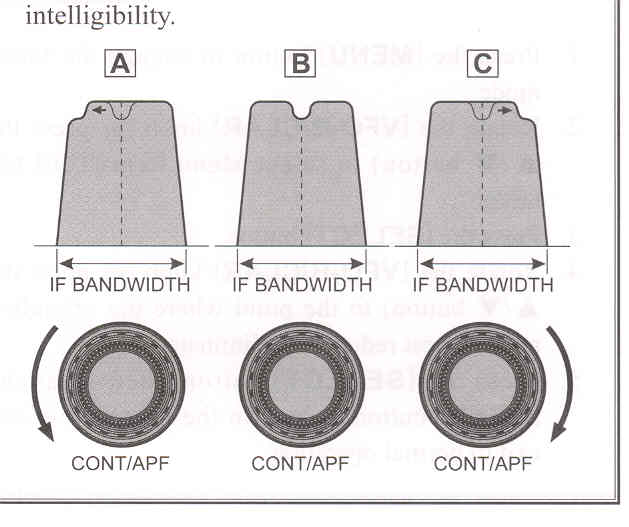
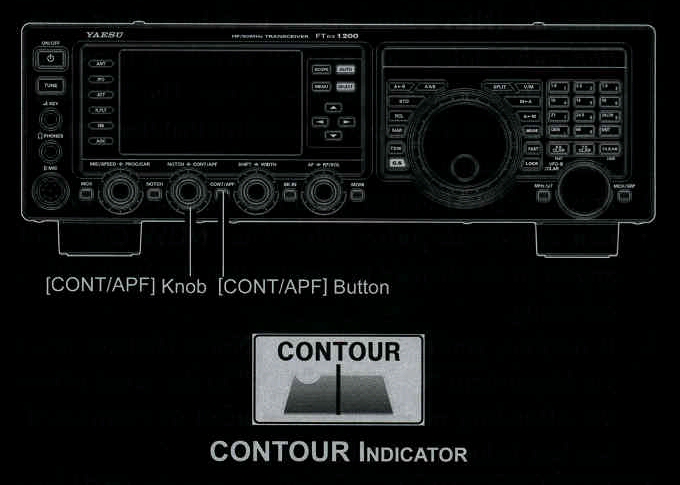
2. Rotate the [CONT/APF] knob to achieve the most natural-sounding audio reproduction on the incoming signal.
ADVICE:
3. To cancel Contour tuning, press the [CONT/APF] button momentarily.
ADVICE:
The display will show the Contour frequency for 3 seconds whenever the [CONT/APF] knob is turned.
Alternate presses of the [CONT/APF] button will switch the Contour filter between on and off.

Refer to Figure "B", this illustrates an "indentation" of the Contour filter in the center of the passband. The Contour filter places a low Q "notch" in the passband, per the settings of Menu items "108 CONTOUR LEVEL" and "109 CONTOUR WIDTH" (referenced above). Counter-clockwise rotation (to the left) of the [CONT/APF] knob causes the notch to move toward a lower frequency within the passband, while clockwise rotation (to the right) casues the notch to move towards a higher frequency within the passband. By removing interferenc or unwanted frequency components of the incoming signal, it is possible to make the desired signal rise out of the background noise/interference, enhancing intelligibilty.